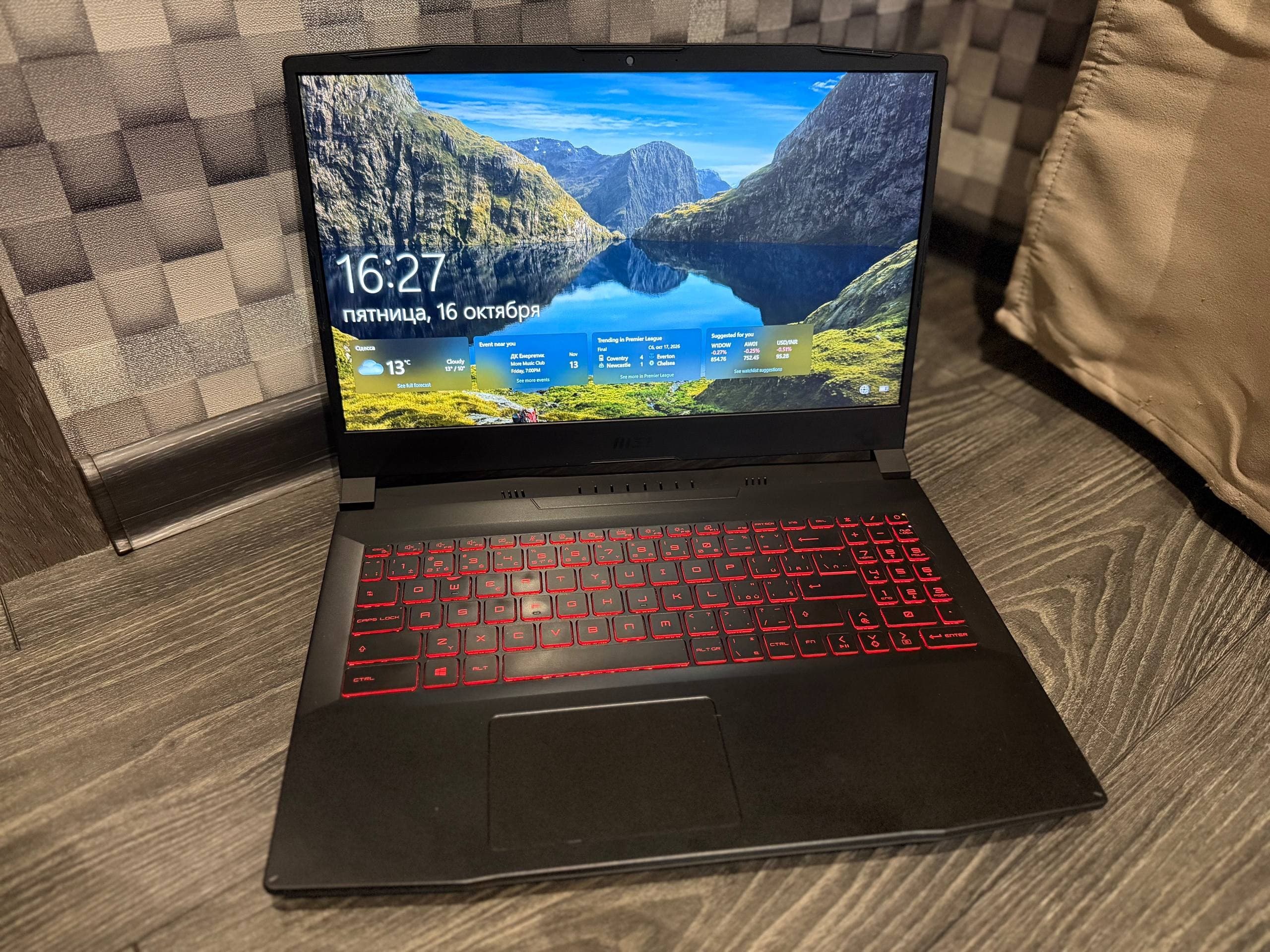
To sell a used laptop in Ukraine, you post a clear listing on a classifieds platform, price it against real local offers, meet the buyer in a safe public place, and take payment only after the device is checked. The whole process usually takes from a few days to two weeks, depending on the model, city and price.

Most sellers lose money on the small things: blurry photos, a vague title, a price pulled from nowhere. Buyers in Kyiv, Lviv, Dnipro and Odesa scroll past those listings without a second look. A laptop that is described honestly and photographed properly gets messages the same day.
This guide walks through pricing, photos, wording, buyer messages, scam patterns, meeting points and the rules that apply to private sales in Ukraine. It is written for private sellers and small businesses who want one clean deal, not a month of haggling. You will find a pricing comparison, a pre-publish checklist and answers to the questions buyers and sellers ask most often.
- Price against five to ten similar listings in your city, not against the original retail price.
- Photograph the laptop in daylight, show the screen on, the ports, the keyboard and any scratches.
- Meet in a public place with power and Wi-Fi, let the buyer test the device, and accept payment only after the test.
- Ignore prepayment requests, courier links and payment screenshots. Real buyers do not need them.
How to price a used laptop in Ukraine
Start from the current market, not from what you paid. Open a marketplace, search your exact model, filter by your city, and write down five to ten prices for devices in similar condition. That range is your ceiling and floor.
Condition moves the number more than age does. A 2021 laptop with a clean screen, original charger and a healthy battery sells for noticeably more than the same model with a swollen battery or a cracked hinge. Storage and RAM matter too: 16 GB and a 512 GB SSD read as a working machine, 8 GB and a 256 GB SSD read as a basic one.
Service history is worth mentioning. If the keyboard was replaced at a service centre in Kharkiv, say so and keep the receipt. Buyers treat documented repairs as a plus, not a warning, as long as you name the fault.
Leave a small margin for negotiation. Almost every buyer will ask for a discount; if your price is already at the bottom of the range, you have nothing to give and the conversation stalls. A price that sits slightly above your target usually closes near it.
Compare what similar machines actually go for on EX & GO before you set the number, because the catalogue shows real asking prices by city and category rather than a single national average. post a listing
How to photograph and describe a used laptop listing
Photos decide whether your listing gets opened. Shoot in daylight near a window, on a plain surface, with the screen on and a neutral wallpaper. Avoid flash, filters and cluttered backgrounds.
Cover these frames: the laptop open and powered on, the lid closed, the keyboard close up, both sides with ports, the bottom with the model sticker, and every scratch or dent in its own photo. Buyers forgive damage that is shown. They walk away from damage that appears at the meeting.
What to put in the title
Write the brand, model, screen size, processor, RAM and storage, then the city. Something like "Lenovo IdeaPad 5 15, Ryzen 5, 16 GB, 512 GB, Lviv" tells a buyer everything in one line. Skip words like "urgent" or "cheap" in the title; they attract the wrong messages.
What to put in the description
State the year of purchase, how long you have used it, battery condition, what is included, and any faults. Mention the reason for selling in one short line. If the laptop is under warranty, name the shop and the remaining period.
Be precise about the battery. "Holds about three hours of browsing" is more useful than "good battery". If you can, check the wear level in the system settings and quote the percentage.
What to leave out
Do not publish photos of documents, receipts with your full name, or the serial number in full. Show enough of the sticker to prove the model, and share the rest at the meeting. Do not promise a warranty you cannot honour as a private seller.
Quick sale, best price or trade-in: which route fits
There is no single fastest or most profitable path. The right one depends on how soon you need the money and how much time you can spend on messages.
| Route | Typical timeline | Price level | Effort | Best for |
|---|---|---|---|---|
| Quick sale at a low price | 1 to 3 days | Below market | Low | Sellers leaving the country or moving flats |
| Standard classifieds sale | 3 to 14 days | Market | Medium | Most private sellers |
| Best price, patient listing | 2 to 6 weeks | Above market | High | Rare or high-spec models |
| Trade-in at a shop | Same day | Well below market | Very low | Buyers who want a new device immediately |
Trade-in is convenient and it costs you. Shops price in their own margin, testing time and resale risk, so the offer is usually the lowest of the four. If speed matters more than money, it is a fair trade. If not, a classifieds listing will beat it.
A low price does not guarantee a fast sale on its own. Listings that sit for weeks usually have weak photos or a description that hides a fault. Fix those two things before you cut the price. used laptops
How to answer buyers and spot scams
Reply within a few hours and keep answers short and factual. Send the same details you published, plus the serial number if the buyer asks. Serious buyers ask about the battery, the charger, the screen and whether the price is firm.
Scam attempts follow a small number of patterns. Learn them once and you will recognise them in the first message.
Fake payment screenshots
The buyer sends an image that looks like a bank transfer confirmation and asks you to hand over the laptop. Screenshots prove nothing. Open your own banking app and check the balance. If the money is not there, the laptop stays with you.
Courier and prepayment tricks
Someone offers to buy the laptop, then asks you to pay a courier fee, a delivery deposit or a "commission" before the deal. A real buyer never asks the seller to send money. Decline and stop replying.
Overpayment and refund requests
The buyer sends more than agreed, then asks you to return the difference by card or transfer. The original payment is later reversed. Accept the exact amount only, and never send money back to a stranger.
Pressure and remote deals
Urgency is the tool. "I am on a train, my friend will collect it, just send the code" is a script. Slow the conversation down. Anyone who refuses a normal meeting in a public place is not a buyer.
Agree on the meeting place in a message, not by voice, and keep that message. A written record of where and when you met is the simplest protection if a dispute starts later.
Where to meet and how to hand over the laptop
Choose a public place with power and Wi-Fi: a shopping centre food court, a co-working lobby, a bank branch or a busy cafe. In Kyiv, places like Gulliver or River Mall work well; in Lviv, Forum Lviv; in Dnipro, Most City. Meet during daylight and bring a friend if you can.
Let the buyer test properly. Plug in the charger, open a browser, play a video, check the camera and speakers, and run a short stress test if they ask. A buyer who is allowed to test rarely returns with complaints.
Take payment after the test, not before. Cash works, and so does a transfer that you confirm in your own app before the laptop leaves your hands. Count cash on the spot if that is the method. If the buyer wants a receipt, write a simple one with the date, model, serial number and amount, and keep a copy.
What applies to private sales in Ukraine
A private sale between two individuals is simpler than a shop sale, and it comes with less protection for both sides. You are not obliged to give a warranty, and the buyer cannot demand a refund for a fault you disclosed before the deal.
Disclose faults in writing in the listing. If the buyer later claims the laptop was damaged, your published description and your messages are the evidence. This is also why you should not delete the chat after the sale.
Income from selling personal belongings is not the same as business income, but rules change and depend on your situation. For anything beyond an occasional private sale, check the current guidance from the State Tax Service of Ukraine or ask an accountant. Consumer rights in Ukraine are set out by the State Service of Ukraine for Food Safety and Consumer Protection, and their published material explains where private sales differ from retail.
Read the platform rules before you post. On EX & GO, listings go through moderation, phone numbers are verified, and the deal itself is arranged directly between the parties. The site holds no payments. The posting rules are short and worth two minutes: /en/rules.
We see the same pattern in buyer messages across categories: the first questions are almost always about the battery, the charger and whether the price is negotiable, so answering those three in the listing cuts the back and forth. If a listing is removed or a buyer behaves badly, report it through the support page rather than arguing in the chat: /en/support.
Checklist before you publish a used laptop listing
Run through this list once. It takes ten minutes and prevents most of the problems that follow.
- Model, processor, RAM and storage confirmed from the system settings.
- Battery wear level checked and written down.
- Six to ten photos in daylight, screen on, damage shown clearly.
- Title includes brand, model, key specs and city.
- Description states year, usage, included items and every fault.
- Serial number and documents kept out of the public photos.
- Price checked against five to ten similar listings in your city.
- City, district and meeting area chosen in advance.
- Payment method decided, with confirmation in your own banking app.
Frequently asked questions
How long does it take to sell a used laptop in Ukraine?
A fairly priced laptop in a large city usually sells within three days to two weeks. Rare configurations and high prices stretch that to a month or more. Speed depends less on the platform and more on three things: the price against similar local listings, the quality of the photos, and how quickly you answer messages. If a listing gets views but no messages, the price is the problem. If it gets no views at all, the title and photos are.
Should I accept payment before handing over the laptop?
No. Let the buyer test the device first, then take payment, then hand it over. Cash is straightforward. With a bank transfer, open your own banking app and confirm the money has arrived before the laptop leaves your hands. A screenshot from the buyer is not proof of payment, because images are easy to edit. If the buyer pressures you to hand over the laptop before confirmation, end the meeting.
What should I do if a buyer asks for a prepayment or courier fee?
Refuse and stop the conversation. In a normal private sale the buyer pays the seller, not the other way around. Requests for a delivery deposit, a courier fee or a commission before the deal are a known pattern. The same applies to overpayment schemes, where someone sends more than agreed and asks you to return the difference. Accept the exact amount only, and never transfer money to a stranger.
Do I have to give a warranty when selling a laptop privately?
As a private seller you are not required to offer a shop-style warranty. What matters is honesty about the condition. Describe every fault in the listing before the sale, and keep the chat and the published description. If a defect was disclosed, the buyer has little ground for a later claim. If you sell regularly as a business, different rules apply, so check the current requirements before you scale up.
Where is the safest place to meet a buyer?
A public indoor space with power and Wi-Fi: a shopping centre, a co-working lobby, a bank branch or a busy cafe. Daylight hours are better than evening. Bring a friend when possible, tell someone where you are going, and agree the location in a message so there is a written record. Avoid meeting at your home, in a car park or anywhere without other people around.
How do I set a realistic price for a used laptop?
Search your exact model on a classifieds platform, filter by your city, and note five to ten asking prices for devices in similar condition. Adjust for battery wear, storage, RAM and any damage. Documented service history supports a higher price. Leave a small margin for negotiation, because most buyers will ask for a discount. Prices that sit at the very bottom of the range often attract low offers rather than fast sales.
What to do next
Pick your price from real local listings, take better photos than you think you need, and write a description that names every fault. Those three steps do most of the work when you sell a used laptop in Ukraine, and they cost nothing but an hour.
Then set your terms before the first message arrives: where you meet, how you accept payment, and what you will not do. Most scams fail against a seller who has already decided. Keep the chat, keep the receipt, and do not delete anything until the buyer has had the laptop for a few days.
If the first listing brings silence, change one variable at a time. New photos first, then the title, then the price. Small adjustments tell you what was actually wrong. A clean, honest listing on a moderated platform with verified phone numbers and visible seller history gives a buyer a reason to trust you, and that trust is what closes the deal.